![kyocera-logo-1.svg]](https://kyoceradocumentsolutions.com.au/hubfs/jan%202021/kyocera-logo-1.svg)
From March 4, 2026, all new products manufactured need to comply with the Australian Cyber Security Act. To align with this requirement, current machines manufactured will no longer have a password with a common format (i.e. serial number). Instead, each device will have a unique password.
This affects:
- The device password to access the system menu
- The admin password to access the command centre web page
Customers still have the option to change the passwords as required. We recommend that you refer to the operation guide to change the password to the desired one.
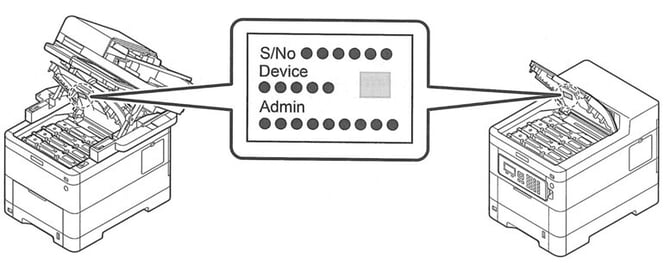
For devices manufactured in July 2025 or after you can find the unique password at the below locations on the device:
- A sticker is placed under the cover
- Or a sticker may be on the right-hand side when opening the toner door
- There is also a flyer included in the box to show where to find the sticker
For further in-depth details, you can refer to the official Australian Government policy (Security Standards for Smart Devices).
Further assistance
If you require further assistance, please feel free to contact us directly via:
- Chat: the chat in the bottom right corner of our website. ↘️
- Phone: to speak to a member of the Kyocera support team, call our helpline on:
- Australia: 135 962 and choose option 3
- New Zealand: 0800 459 623
Phone Support hours are Monday to Friday 9am to 5pm local time across Australia and New Zealand (excl public holidays).
Chat Support hours are 9am to 5pm AEST/AEDT.